
Case study
Labourly - Redesigning the Hiring Experience
Labourly is a B2B SaaS platform built to match qualified workers to jobs by tracking certifications, documents, and licensing. I led the end-to-end redesign of the job board and its entire connected ecosystem, working across all three user types on the platform: HR managers, candidates, and clients – to reduce friction and give every user a faster, more confident hiring experience.
Role
UX/UI Designer, solo end-to-end
Company
Resonant Solutions – Labourly product
Tools
Figma, FigJam, Adobe XD
Platforms
Desktop, Tablet, Mobile
What is Labourly?
Labourly is a hiring platform built for staffing agencies and the businesses they place workers with. It exists to close the gap between “qualified” and “hired” – tracking certifications, documents, and licensing so HR teams can move a candidate from application to placement without chasing paperwork across five different tools.
Too many clicks, too many systems, not enough context
The original job board was functional but inefficient. HR managers had to jump between multiple screens – sometimes multiple systems – just to review a candidate against a job. There was no way to see a candidate profile and job description side by side. The ATS matching engine existed, but its results weren’t visible without drilling into individual profiles.
01
No side-by-side view, switching back and forth between candidate and job manually
02
Match percentage buried in profiles – no at a glance read on candidate fit
03
Job post list missing key info – no fill date, start date, hire type, or creator
04
No “move forward” feature – stage changes required opening a full profile
The business goal
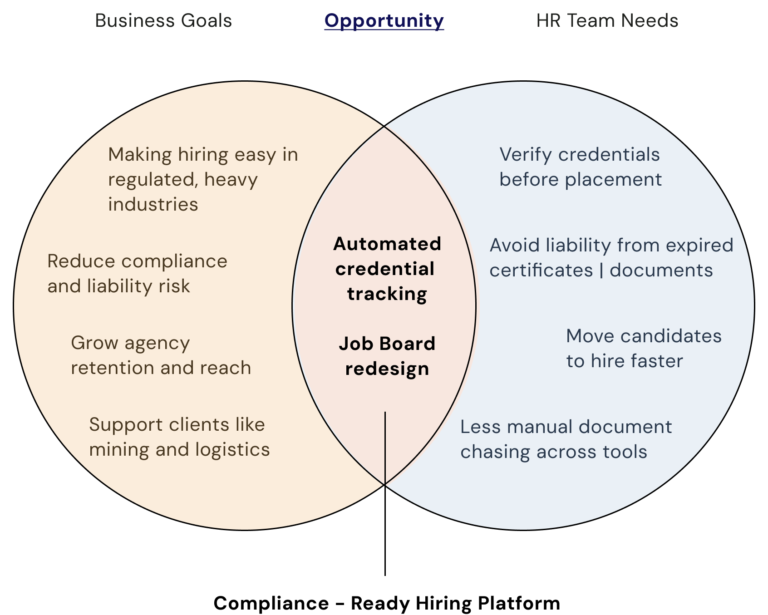
Resonant built Labourly for industries where a hire isn’t just a resume match – it’s a compliance decision. In sectors like mining, every candidate needs the right certifications, licenses, and safety documents verified before they can be placed, and getting that wrong carries real risk. The business goal was to make hiring in these industries feel as easy as hiring anywhere else: every credential tracked through the entire process, without HR having to open a dozen profiles to piece it together by hand.
Three users, one platform
HR managers, candidates, and clients all live inside the same system, but need very different things from it. Understanding how their responsibilities overlap – and where one user’s action creates the next user’s task – shaped every decision in this redesign.
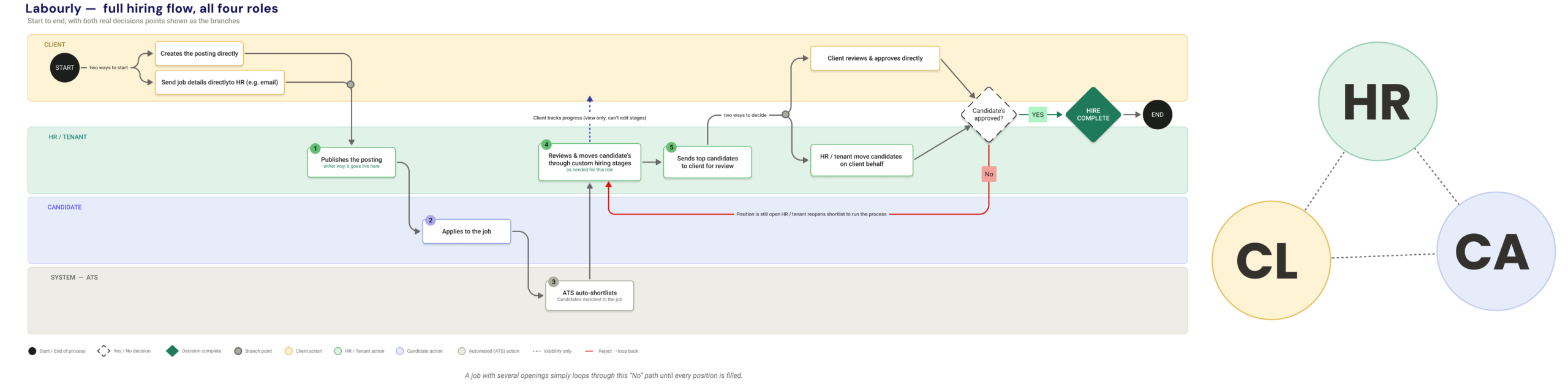
HR Managers
- Create and manage job postings independently
- Review and match candidates via ATS
- Move candidates through custom hiring stages
- Send shortlisted candidates to clients
- Manage documents, certifications, background checks
Candidates
- Manage profile, documents, certifications
- Apply to jobs and track application status
- Receive stage updates as they move through the process
Clients
- Create job postings and send directly to HR
- Track job progress and fill status
- Review shortlisted candidates before hire
When clients prefer a hands-off approach, HR manages the entire process end to end without client involvement. Clients can also hand full control to HR, staying uninvolved until a hire is ready to confirm.
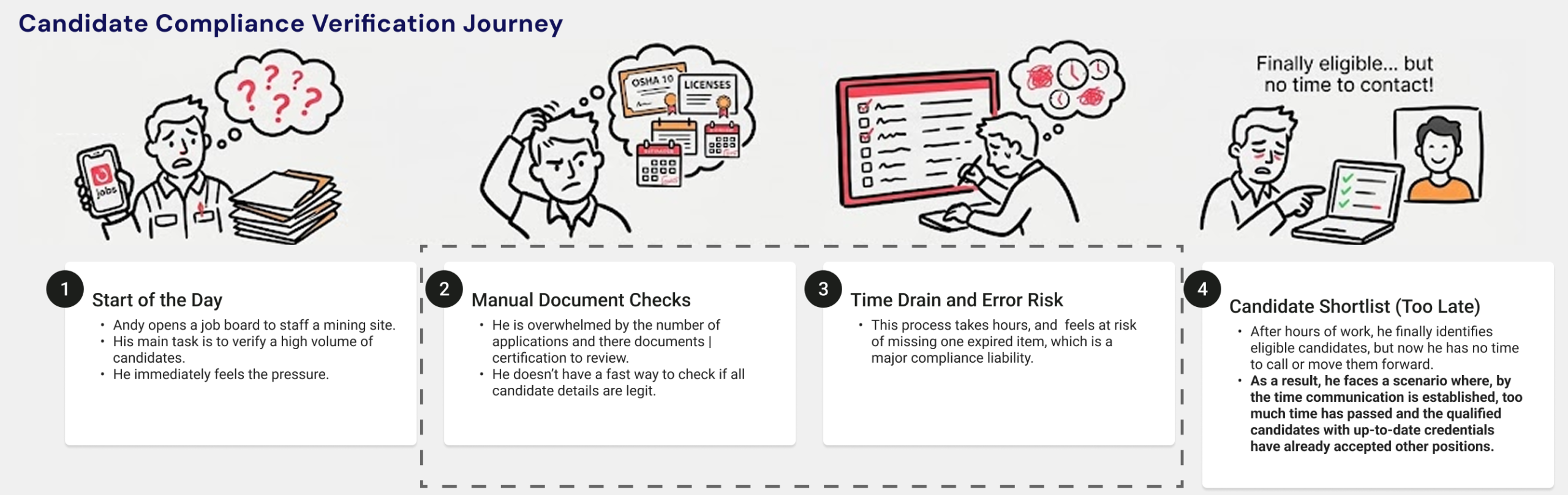
Imagine this user journey:

Andy, HR Manager
Andy is staffing an active mining site. Every candidate needs current safety training, equipment licenses, and site clearances verified before they can even be considered – and one expired certificate is the difference between a compliant hire and a liability.
His mornings start the same way: open the job board, click into candidate after candidate, checking whether each one’s documents are current or missing. By the time he’s confirmed who’s actually eligible, he’s lost the time he needed to move anyone forward.
Research - watching real users do real work
Before any design decision was made, I needed to understand where the platform was actually breaking down — not from assumptions, but from observation. I ran contextual sessions with HR managers and clients over video calls with screen sharing, watching them use the existing platform as they completed their actual day-to-day tasks.
Situation
The platform had been in active use, but the team had limited visibility into where users were struggling — no clear picture of what was slowing hiring down from the user’s side.
Task
Identify the real friction points before touching any design, so the redesign solved actual problems, not assumed ones.
Action
Observed HR managers and clients live over screen share, working through real tasks. Noted every hesitation, tab switch, and extra click.
Result
Every core problem in this redesign came directly from those sessions — match visibility, missing job metadata, and click count were the consistent frustrations.
Let's design the flow
Labourly is a live platform built for enterprise hiring teams. Rather than redesigning every screen from scratch, I focused on optimizing the three highest-friction workflows identified during user research:
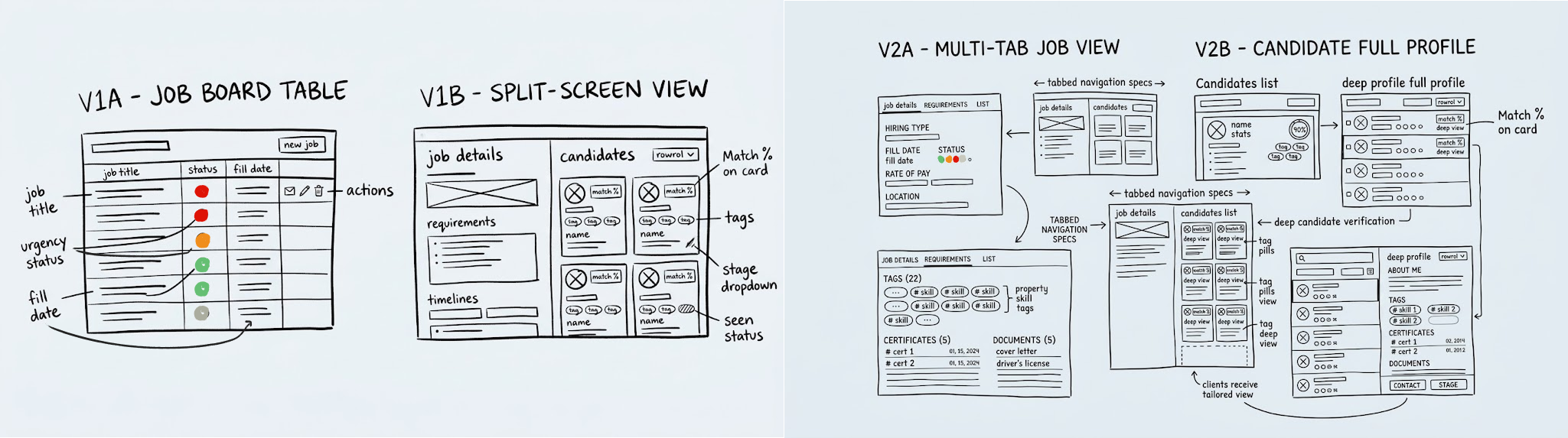
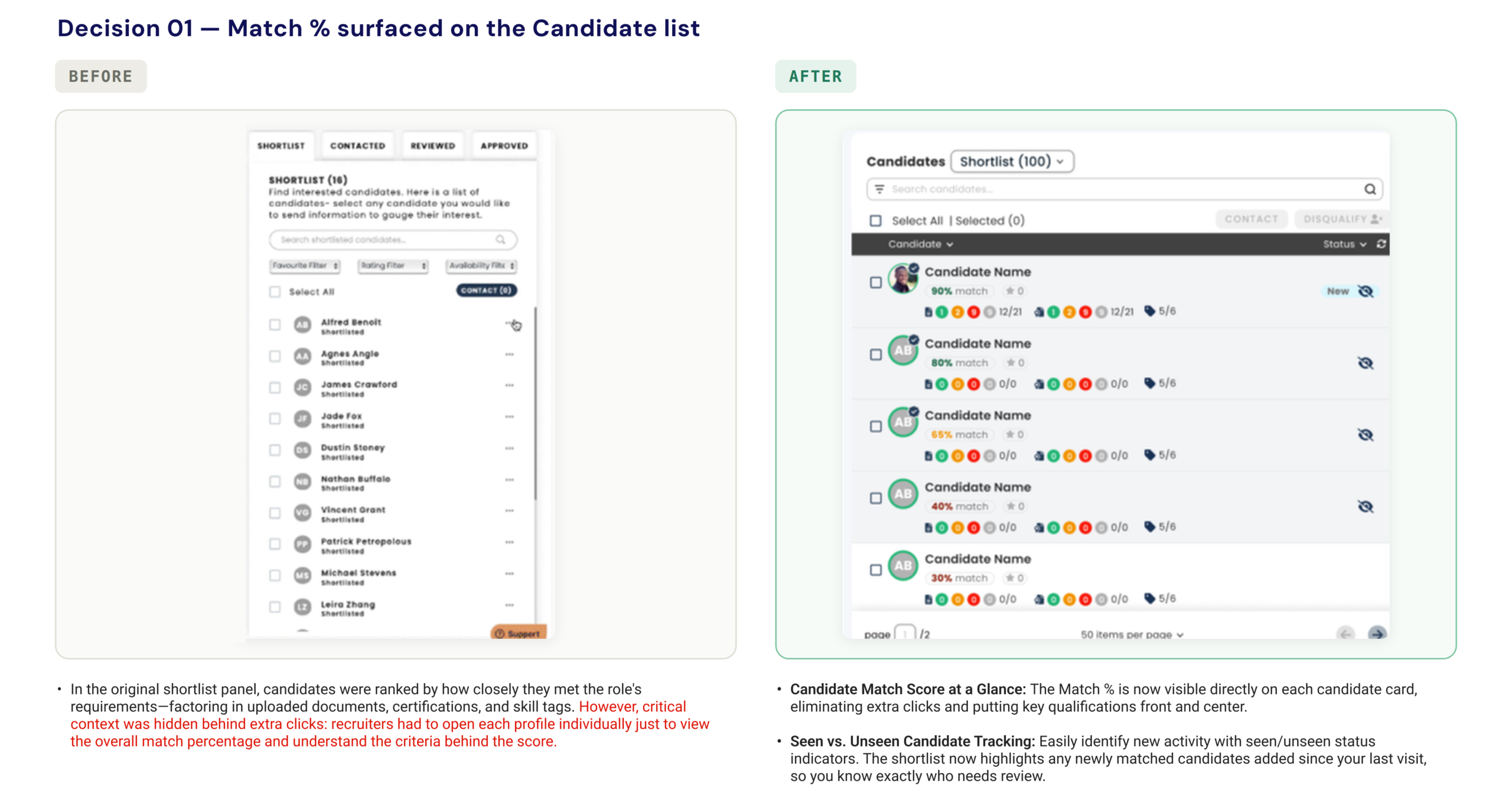
At-a-glance candidate evaluation. Surfacing match percentages directly on candidate cards to cut repetitive profile clicks.
Review queue prioritization. Tracking seen vs. unseen candidate activity so recruiters instantly recognize newly matched applicants.
Frictionless candidate progression. Moving candidates across stages directly from list views without routing to settings pages.
Early wireframes
Challenges along the way
Challenge
Reusing partially built legacy components under strict dev constraints.
A key constraint from leadership was to preserve existing modals and layout structures inherited from the previous designer, as the engineering team had already partially coded them.Introducing net – new design patterns was off the table due to dev bandwidth and launch timelines.
My Approach
High-leverage micro-adjustments over architectural rewrites.
Instead of fighting the existing component structure, I identified high-impact additions that could live within the legacy framework. Surfacing ATS match scores on the card face – along with a quick view for document and certification expiries – and adding seen/unseen visual indicators resolved the primary friction points without requiring devs to rewrite backend schemas or overhaul the frontend layout.
Challenge
Eliminating deep administrative round-trips without adding UI clutter.
Managing pipeline stages previously required recruiters to leave their active review screens, open individual profiles, or navigate to a dedicated settings page. The challenge was enabling quick stage customization and candidate status updates on the fly without turning the candidate table into a dense, overwhelming interface.
My Approach
Inline progressive disclosure within existing dropdowns.
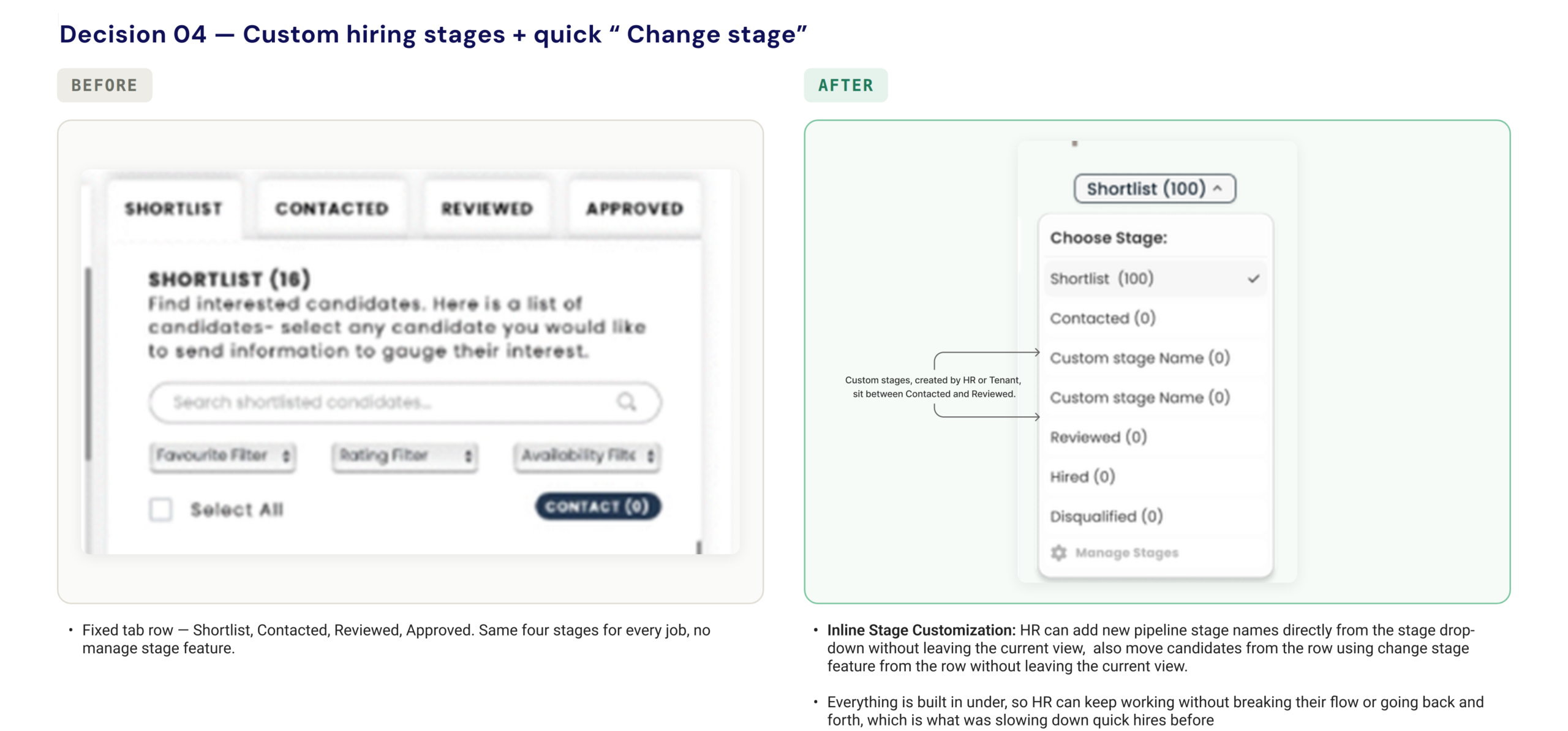
I integrated stage creation and row-level candidate reassignment directly into the existing dropdown pattern. HR can name custom stages and advance candidates on the spot, keeping recruiters focused in their flow state while reducing administrative clicks.
What changed and why
Previously buried in individual profiles, the ATS match score and key candidate details now show directly on the candidate list card, giving HR managers an at-a-glance read on fit – no extra clicks.
Positions approaching their fill date now appear at the top of the ATS list automatically, instead of relying on generic ordering or manual filtering.
Fill date, start date, hire type, and creator are now all visible, with Colour used intentionally on date fields – a warm treatment for roles nearing their fill date, neutral for roles with comfortable runway.
HR teams can now create their own stages to match how they actually hire, and move a candidate forward without opening a full profile.
A notifications bell and messages indicator keep alerts visible without navigating away, while a smaller header footprint gives more vertical space to the job board and candidate lists.
Challenge
Placeholder, real challenge to fill in.
My Approach
Placeholder, your real resolution to fill in.
The same system, transformed
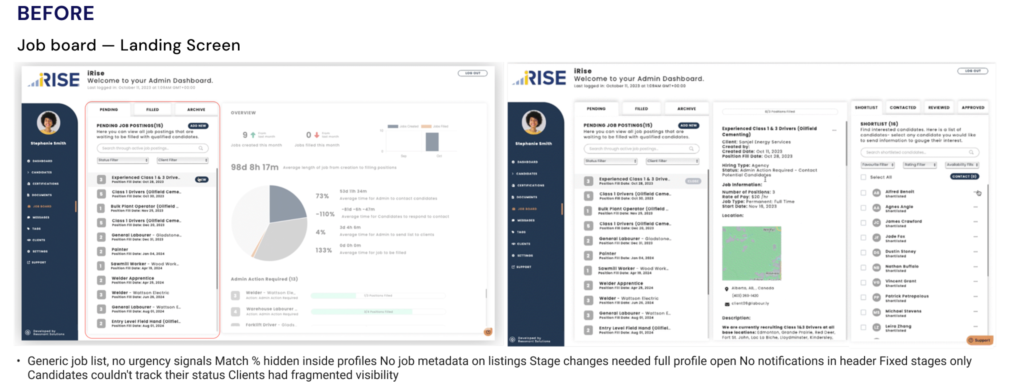
Before
– Generic job list, no urgency signals
– Match % hidden inside profiles
– No job metadata on listings
– Stage changes needed full profile open
– No notifications in header
– Fixed stages only
– Candidates could not track their status
– Clients had fragmented visibility
After
+ Urgent roles surface automatically
+ Match % visible on list and profile
+ Fill date, start date, hire type, creator shown
+ Change stage on list and profile
+ Notifications and messages in header
+ Custom stages per team workflow
+ Candidates see stage progress clearly
+ Clients have consolidated view
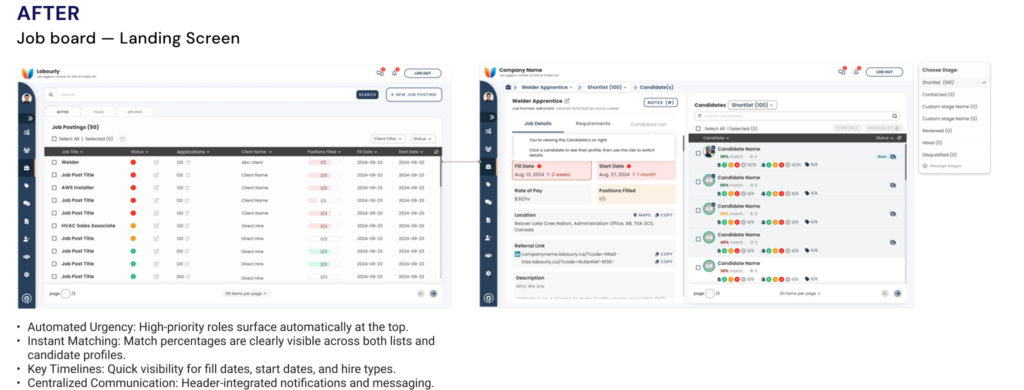
Candidate list — match % on card, “Change stage” inline via dropdown.
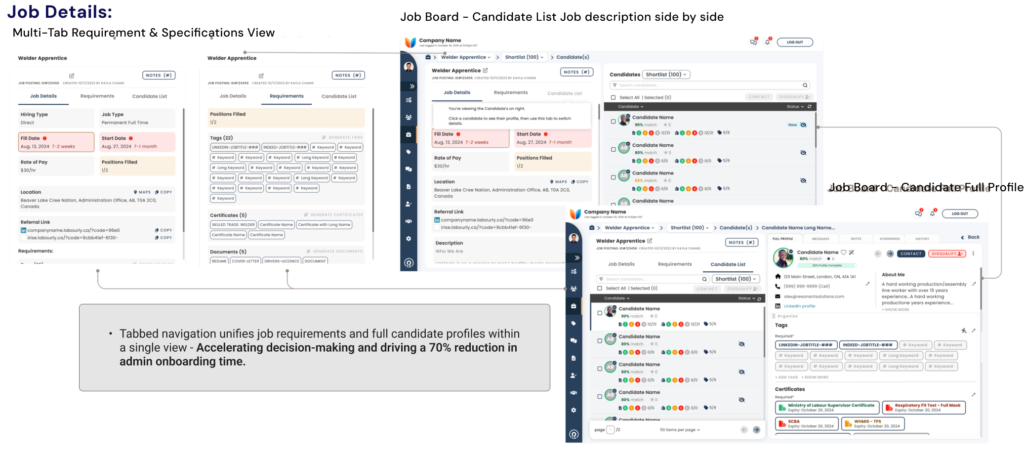
Job detail redesign — fill date, start date, hire type with colour urgency treatment.
What changed for the people using it
Fewer clicks to decision
HR managers making 15–20 hiring decisions a day no longer needed to open a profile just to check fit.
Urgency made visible
Urgent roles no longer got buried in a generic list — they surface automatically, before a fill date becomes a problem.
Hiring stages owned by the team
Custom stages replaced a fixed workflow that never matched how agencies actually hire.
Candidates informed, not guessing
Fewer status check-ins — candidates can see exactly where they stand in the process.
Clients with full visibility
Clients no longer have to ask HR for updates — they can see job progress themselves.
A cohesive system
The whole system feels like one product instead of six separately patched screens.
70% reduction in admin onboarding time
HR managers who used to lose their mornings to profile-by-profile document checks now clear the same review in a fraction of the time.
40% increase in sales calls
A faster, more confident hiring experience gave the sales team a stronger story to sell on, and it showed up directly in call volume.
12% growth in new client accounts
Clients who could finally see job progress themselves, instead of chasing HR for updates, stuck around and brought more business in.
17% increase in document uploads
Candidates who could see exactly where they stood in the process were more likely to follow through on what was asked of them.
“Placeholder, a real quote from a PM, stakeholder, or HR manager goes here. Leave this section out entirely if you do not have one.”
Name, Role, e.g. Product Manager, Resonant Solutions
Learnings
Restraint and leverage move the needle more than new features
The ATS match score, urgency ordering, and stage changes weren’t new features – the logic already existed in the platform. The design just wasn’t working with it. Surfacing what was already there, in the right place, at the right moment, moved the needle more than building anything new would have. That was most visible in the match percentage change: it existed in the data the whole time, just buried in a profile page nobody opened during a fast review.
Designing inside real constraints is its own skill
Working within legacy components that were already partially coded, and coordinating changes through an outsourced dev team, meant I couldn’t default to “redesign it properly.” I got sharper at finding the smallest change that solved the real problem instead of the most elegant one, which turned out to be the more useful skill for a live product with real users on it.
Good systems design isn't always visible in a single screen. It shows up in how the whole thing holds together - and how naturally each user, whether HR manager, candidate, or client, can do what they came to do without thinking about it.
What's next
Being the only designer across all three user types simultaneously meant every decision had to hold up from multiple angles before it landed anywhere. If I had more time, here is where I would take it next:
- Turning the dashboard into a guide, not just a summary. An AI agent that picks up where HR left off, surfacing what needs attention next instead of waiting to be asked.
- Fewer decisions, better timed. Flagging a stalled posting or an expired document directly, instead of HR having to scan every posting to find it.
- Early days, deliberately. This is still in initial exploration, early mockups and flows, not a shipped feature, but it is the direction the platform is heading.
This is early, client-side work, so the specifics stay with them for now.